7 Best Google Review Cards in 2026

Share The Love:
TL;DR
- Google review cards help customers reach your review link faster
- NFC taps and QR scans cut friction and drive higher conversion
- Physical cards boost real-world visibility at checkout, events, and tables
- The best options offer custom branding, bulk pricing, and fast scanning
In a digital market teeming with options, Google review cards for business guide potential customers toward—or away from—your location or website.
As a small business owner or savvy entrepreneur, you must understand the impact a glowing or grim Google review can have on your bottom line.
In fact, 87% of consumers read online reviews before considering whether to contact a local or service-based business. Therefore, it’s imperative to bank on tools that make the review process seamless and insightful.
AFFILIATE DISCLAIMER: As an affiliate, I may receive a commission on any purchases made through the links provided. I only promote products and services that I believe provide value and guarantee honest opinions in my reviews.
What Google Review Cards Do for Businesses Today
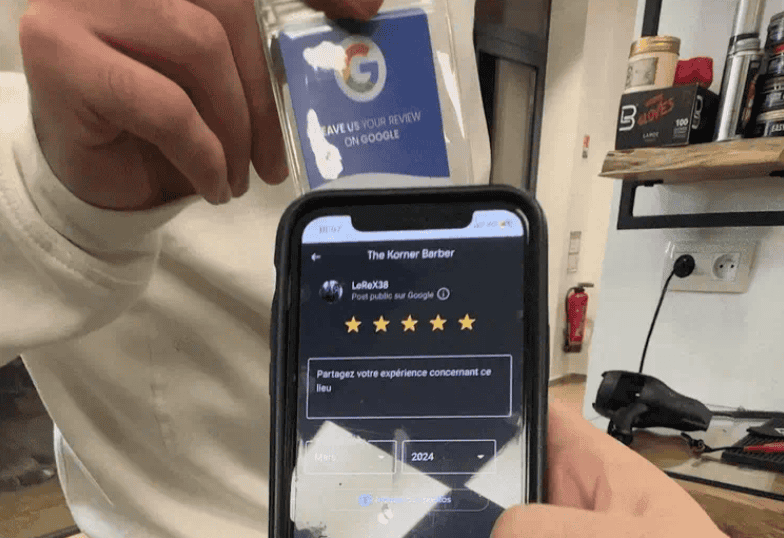
Small moments shape customer decisions faster than ever. A friendly reminder at the right time prompts more people to leave positive feedback online, and Google review cards create that tiny nudge. They work as physical tools that make the review process easier with one tap or scan.
Many brands place them near checkout counters, service desks, event booths, or inside product shipments to capture fresh impressions while customers still feel great about the experience.
Old-school directions like “search our business on Google and leave a review” create friction. Review cards reduce that friction by sending customers straight into the review screen — no searching, no confusion, no extra steps.
What a Google Review Card Actually Is
A Google review card is similar to a digital business card. It acts as a physical shortcut to your Google Business Profile’s review page. Most cards use two technologies:
NFC
Customers tap their phone on the card and land instantly on your review form.
QR Code
Customers scan the printed code with their camera to open the same review link.
Many cards combine both to serve any type of customer device. Some teams carry portable cards for events and fieldwork, while others place heavy acrylic versions permanently at front desks.
How Google Review Cards Work
A single tap or scan triggers your direct review URL. Most card providers personalize this URL with your business details before printing.
When customers complete the review, it publishes directly on your Google Business Profile and influences visibility across Maps and local search.
Some providers add analytics dashboards, bulk order discounts, or upgraded materials such as bamboo, acrylic, metal, or premium PVC. These help match your brand style or withstand heavy foot traffic.
You can expect higher conversion because the process eliminates confusion and keeps your customer inside Google’s interface with no detours. Automate your Google Reviews, and you will see an increase in volume and ratings.
7 Best Google Review Cards in 2026
1. Digifeel

Seamless Customer Experience
Digifeel stands at the forefront of the user experience revolution with its AI-driven sentiment analysis.
What it is
A compact NFC + QR review card designed for fast in-person review collection.
Features
• NFC tap
• QR scan
• Plastic or metal options
• Fast setup
Best for
Local businesses that want an affordable, durable card for daily use.
Pricing

🔥 Use Digifeel Discount Code “KENJONES” for an additional 15% OFF 👍

2. V1CE

Social Proof Amplified
V1CE takes the social review concept to the next level with its built-in social sharing features.
What it is
A premium NFC card brand known for high-end materials and sleek design.
Features
• NFC tap
• Metal or PVC builds
• Minimalist branding
• Custom finishes
Best for
Agencies, professionals, and brands that care about presentation.
Pricing


3. Tap Tag

Interactive and Engaging
Tap Tag is a nifty card that sports NFC technology with an optional QR code, allowing your customers to tap and leave positive reviews right from their smartphones.
What it is
A lightweight NFC review card with broad device compatibility.
Features
• NFC tap
• QR scan
• Slim PVC card
• Portable design
Best for
Field teams and service professionals who carry cards on the go.
Pricing


4. Boostap Google Review Cards

Automate Reviews For Speedier Results
Boostap elevates your Google review game with its intuitive interface and powerful features.
What it is
A simple review card system focused on ease of use and quick deployment.
Features
• NFC tap
• QR scan
• Clean layout
• Easy activation
Best for
Small businesses that want a straightforward review solution.
Pricing


5. ReviewBoost

Gamification and Rewards
ReviewBoost Google Review Cards lean into the psychology of behavior by adding a dash of gamification to get more Google reviews.
What it is
A durable review card built for counters, desks, and checkout areas.
Features
• NFC tap
• QR scan
• Acrylic or PVC builds
• Custom branding
Best for
Retail shops, cafés, and front-desk environments.
Pricing


Use ReviewBoost Discount Code “KENJONES” for an additional 25% OFF 👍
6. mTap

Simplicity Refined
mTap is a plug-and-play solution that integrates seamlessly with your website. It offers a no-nonsense approach with an unobtrusive design.
What it is
A multifunction NFC card that supports review links and digital profiles.
Features
• NFC tap
• QR scan
• Multi-link support
• Compact form
Best for
Businesses wanting flexibility beyond Google reviews.
Pricing


7. Popcard Google Reviews

Increase Review Ratings In Record Speed
Popcard is a review card that streamlines the ranking process to land you at the top of the SERPs within a few weeks.
What it is
A modern NFC card designed for brand interaction and feedback.
Features
• NFC tap
• QR scan
• Custom branding
• Lightweight design
Best for
Events, pop-ups, and brand activations.
Pricing


Where to Place Your Review Cards for Best Results
Front desks and checkout counters capture high-intent moments when customers feel most satisfied. Service professionals often place cards in their pocket to hand out immediately after finishing a job.
Restaurants use them on tables to engage diners during downtime. Event vendors keep them near displays to encourage quick engagement while the experience feels exciting.
You can also add cards to your packaging or insert them with handwritten thank-you notes to encourage a personal connection.
Business Considerations For Collecting Google Reviews
When evaluating review cards for Google My Business, remember to assess its compatibility with your existing digital platform. It should seamlessly integrate without causing a design overhaul or technical hiccups.
If your entity has multiple touchpoints and employees, consider utilizing a 5-star google review generator. Platforms with a holistic strategy will help attain much needed results before the competition.
Data security and privacy compliance should be non-negotiable. Additionally, consider the support and scalability the platform offers, especially for growing businesses or those with diverse digital touchpoints.
Next Level Tactics to Increase Google Reviews
Streamline the Process:
The one-tap review cards mentioned above can significantly boost your Google review count. Eliminate steps, simplify prompts, and ensure that the reviewing process is as effortless as possible.
Incentivize Reviews:
Offering small incentives or creating a loyalty program centered around reviews encourages customers to participate actively.
Timing is Key:
Studies show that timing your review request can impact response rates. Make sure to train staff on how to ask for reviews when the customer experience is fresh in their minds.
Respond to Reviews:
Engage with your customers, and respond quickly to positive AND negative reviews. This not only shows that you value their feedback but also adds a personal touch to your brand.
Wrapping Up
Encouraging clients and patrons to leave a review is more than an attempt to collect stars. Doing so develops a culture of feedback that’s honest, immediate, and actionable.
Start using business Google review cards now to chart a new course for customer engagement that goes beyond the conventional business card.
Frequently Asked Questions
How do Google review cards increase reviews?
They simplify the process with one tap or scan. Less friction means higher completion rates.
Do NFC Review Cards Work On iPhone And Android?
Yes. Most modern phones support NFC. QR codes act as backup for older models.
Where should a business place these cards?
Counters, waiting areas, product packaging, event tables, or handed directly to customers.
Are review cards worth it for small businesses?
Yes. They reduce friction and help small teams collect consistent positive feedback.

Ken Jones
Ken empowers small business owners and entrepreneurs to scale productivity through innovative content creation, strategic planning, and cutting-edge technology. He’s passionate about helping businesses thrive in the digital age.